
|
| Stop Hidden Threats with Cloudmersive Archive Scanning |
| 8/21/2026 - Brian O'Neill |
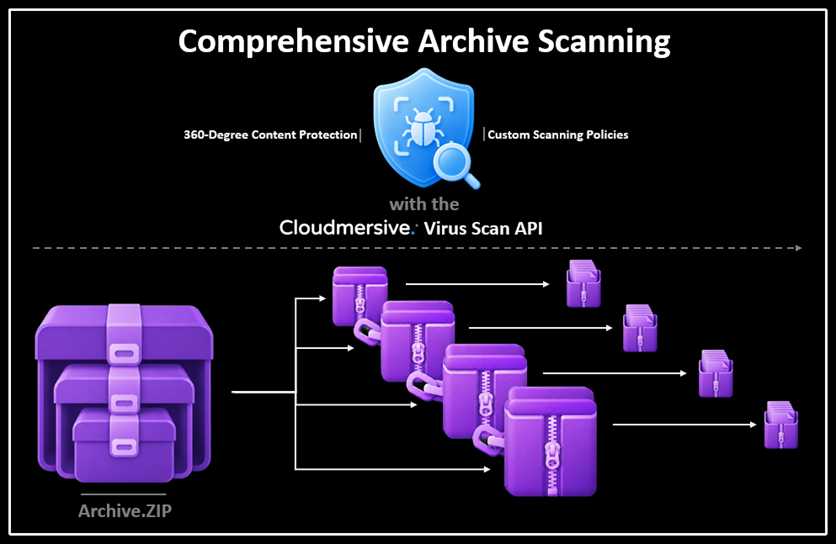
Archive files like ZIP, RAR, 7ZIP, and others often appear small and unassuming while disguising a significant amount of complexity. A single ZIP upload can include thousands of files, encrypted data, misleading file extensions, and additional threat-laden archives nested several layers deep. The deceptive complexity of archives makes threats easier to hide and harder to identify. Cloudmersive makes that complexity easier to manage. Comprehensive Archive Scanning is a built-in feature of Cloudmersive 360-Degree Content Protection via the Virus Scan API, and it's a customizable feature of Cloudmersive Multi-Threat detection. The Cloudmersive Virus Scan API recursively inspects compressed files, analyzes the content inside each archive layer, and returns a unified security result that your applications can act on right away. This gives your team a practical way to scan complex archives without having to build and maintain the extraction, security, and scaling infrastructure yourself. Why effective archive scanning mattersArchives make it easy to package and share large collections of files. That's nifty when trusted authors are involved, but that same convenience also gives attackers a powerful way to obfuscate malicious or otherwise prohibited content. A harmless-looking ZIP file might contain any number of threats: an executable buried inside another archive, a document with malicious macros, a script disguised with the wrong extension, NSFW material, or a deeply nested file designed to expand and use excessive processing resources. Some archives also contain hundreds (or even thousands) of child files, so one upload can create a much larger scanning workload than its compressed size suggests. Effective archive scanning is a bigger job than simply opening the outer container and peeking inside. Scanners need to understand an archive’s structure, safely access its contents, and apply stringent security policies against every accessible layer. They also need to incorporate sensible boundaries for archives that are unusually large, impractically deep, or excessively complex. That's a lot more work than the average file needs in a threat scanning workflow, and Cloudmersive handles it gracefully from end to end. How Cloudmersive scans archivesWhen the Cloudmersive Virus Scan API digs into an archive, it first rigorously validates the file format and examines its declared structure. This produces useful per-file context before recursive directory scanning begins, yielding important information about the files inside and revealing archive characteristics that may, in extreme cases, immediately indicate it's unsafe to open. Cloudmersive then progresses through the archive, scanning each and every member along the way. If any of those members are nested archives, scanning continues recursively into that layer after the current layer is fully explored. With 360-Degree Content Protection, all member files discovered within an archive are investigated for malware, executables, scripts, macros, invalid content, misleading file formats, and a variety of other content-based risks. Your custom policies (controlled via the Cloudmersive Management Portal) dictate the exact scope of the scan, including which content types should be allowed or rejected. Once the scan is complete, findings are combined into an overall security result that your security teams can use immediately. You can decide to permit the archive, reject it, move it into quarantine, or trigger any other automated response your organization deems appropriate. Cloudmersive Virus Scan API scan findings are always logged in the Cloudmersive Management Portal (CMP), and archive-related threats are no exception. The Threat Analytics page gives your security and operations teams a central place to review archive threats in exceptional detail. In there, they can investigate affected files and nested paths as well as monitor recurring patterns alongside the programmatic scan results. All this happens through one scanning workflow, even when the original archive contains a complicated tree of nested files.
Input
Archive received
Analyze
Structure and metadata examined
Recurse
Nested members scanned
Protect
Custom policies enforced
Verdict
Allow block or quarantine
Scan deeply nested and mixed-format archivesReal-world archives don’t always follow a neat, predictable structure. For example, a ZIP file might contain a RAR archive member, which may in turn contain a TAR archive member, which may then contain a set of dangerous documents, images, scripts, and executables. Cloudmersive recursively inspects all supported nested archive formats, including ZIP, RAR, 7Z, TAR, and others. As always, your custom security policies govern threat detection as scanning moves through each accessible archive layer. When the archive container format changes at each level, the archive structure can become difficult to follow. That's why Cloudmersive maintains consistent visibility so every accessible child file can be evaluated according to your organization’s policy. Through policies, you can define how each unique archive format and content type should be handled. Depending on your needs, certain formats can be scanned, skipped, or blocked. Detect more than conventional malware in archivesArchives are an ideal tool for malware obfuscation, and that naturally means malware signature-matching is a critical important part of archive scanning. Ultimately, however, known malware is only one small piece of the larger security picture, and Cloudmersive digs much deeper to keep your organization safe. Cloudmersive 360-Degree Content Protection combines malware detection with content verification and additional threat checks. This identifies potentially dangerous executables, scripts, macros, invalid files, disguised file types, unsafe archives, and encrypted or password-protected content even when no malware signatures are present. Content verification is especially important when file names and extensions can’t be trusted. For example, a file that looks like an image or document may actually contain content that's completely different. Cloudmersive looks past surface-level information like file extensions to evaluate the underlying file content, giving your applications a more dependable basis for making important security decisions. Custom controls in the CMP allow you to apply consistent policies across the entire archive. Identify archive decompression bomb indicatorsDecompression bombs (e.g., ZIP Bombs) are archives designed to expand into an extreme volume of data and/or consume excessive processing resources. Some rely on unusually high compression ratios, while others lean on a huge volume of child files or deeply nested archive structures. Cloudmersive analyzes archive metadata for specific characteristics associated with decompression bombs. This metadata-first approach helps identify clear signals like extreme compression, excessive file counts, and suspicious declared sizes before the full contents are expanded. Archive-processing guardrails add another layer of protection. Custom policies configured in the CMP allow you to control recursive depth, child-file counts, archive size, individual member size, and related processing boundaries. These limits prevent scans from consuming unlimited resources when any archive is exceptionally large or complex. It's important to note, however, that detection and processing limits serve different purposes. Metadata analysis identifies suspicious archive characteristics, while processing limits define how much work the scanner is actually allowed to perform. If, for example, part of an archive can’t be inspected because a configured boundary is reached, that content remains unverified and is subsequently handled according to your policy.
Archive
Compressed file received
Metadata
Expansion signals measured
Detect
Bomb indicators identified
Control
Processing limits enforced
Action
Continue block or review
Handle encrypted and password-protected content safelyEncrypted archives create a major visibility challenge in threat scanning workflows: their contents can’t be inspected without decryption, and decryption requires a password. The same issue can occur at any level of a nested archive. Cloudmersive 360-Degree Content Protection identifies encrypted or password-protected content and shares that information with the surrounding workflow. When decryption passwords are made available to Cloudmersive, the archive can be scanned. When the content remains inaccessible, you can decide via custom policies whether to block the archive outright, quarantine it for later inspection, or send it elsewhere in your organization's infrastructure for further review. These decisions are applied consistently across nested structures (an accessible outer archive doesn’t make an encrypted archive several layers below it safe). Cloudmersive continues evaluating the structure and reports inaccessible content wherever it appears. Control how complex archives are processedAs noted throughout this article, custom policies allow you to tailor archive processing to the needs of each specific workflow. A public upload portal, for example, may benefit from restrictive controls, while an internal migration workflow may need to support much larger archives and deeper recursion. 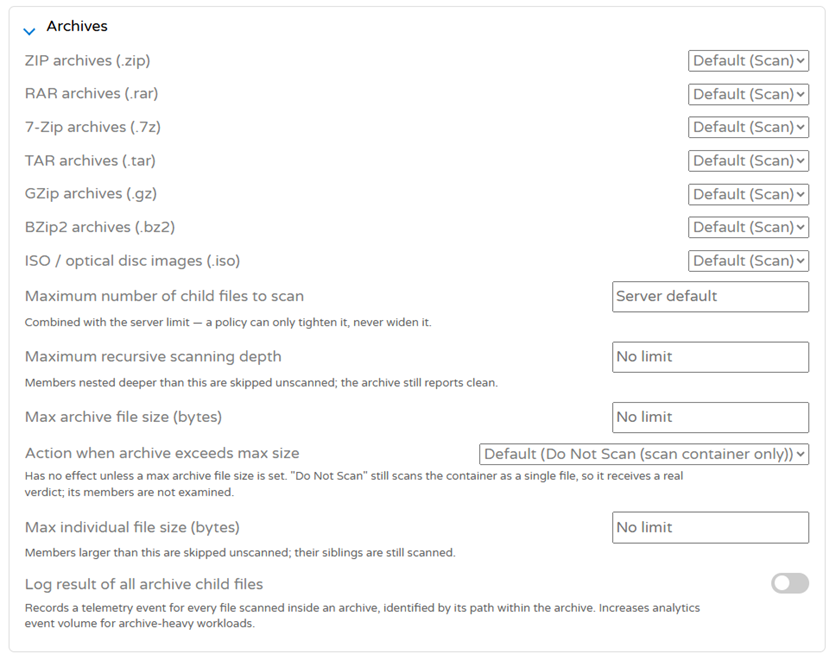
Cloudmersive archive scanning policies let you define exact limits to fit each protected environment. You can uniquely and independently govern recursive depth, the number of child files scanned, archive and member sizes, encrypted content, and the list of accepted file formats for different workflows. Your custom policy is an enforceable part of the application workflow. Files that meet your requirements pass through automatically, while suspicious, prohibited, or unverified files are blocked or redirected. Cloudmersive's detailed archive telemetry gives your teams visibility into the specific files discovered inside each archive. Archive threat events and related scan activity can be conveniently reviewed in the CMP, helping your team understand why a scan produced a particular result, where a suspicious file appeared within the archive structure, and whether similar threats are recurring across uploads. Built to handle archive scanning at scaleArchive workloads can vary significantly. One archive scan request might contain a small ZIP file with a few documents, while the next may contain a complex, deeply nested archive with thousands of members. Archive-processing needs to be able to handle unpredictable workloads efficiently while maintaining reliable performance and resource usage. Cloudmersive uses stateless request distribution and parallel processing infrastructure to distribute scanning workloads across all your available processing nodes. Deploying additional nodes adds extra horizontal capacity as archive volume and complexity grow. This architecture is designed to help support large archives, complex archive structures, concurrent scan requests, and sudden traffic spikes without ever creating a single-server bottleneck. You can scale your scanning capacity directly alongside the applications and workflows that rely on it.
Demand
Variable archive workload
Route
Requests distributed
Process
Parallel nodes scan
Scale
Capacity expands horizontally
Result
Scanning grows with demand
Deployment optionsCloudmersive archive scanning is available through flexible deployment models to support different performance, governance, and infrastructure needs. Public CloudCloudmersive Public Cloud provides access through a multi-tenant cloud API. It offers a simple way to add archive scanning to applications and automated workflows without managing the scanning infrastructure yourself. Managed InstanceA Managed Instance provides dedicated Cloudmersive-managed infrastructure with service-level agreements, customizable configuration, and enterprise security controls. You get dedicated capacity while Cloudmersive manages the underlying environment. Private CloudPrivate Cloud deployment brings Cloudmersive into your own data center or chosen cloud environment. It’s a good fit for organizations that need direct control over infrastructure, network boundaries, and data location. PaaSCloudmersive can be deployed through supported platform services such as Azure App Service or Azure Kubernetes Service. This option provides additional flexibility for teams building within existing Azure architectures. Government CloudGovernment Cloud deployment places Cloudmersive within a specified government cloud region. This helps government organizations and contractors address specific data-governance and infrastructure requirements. Start scanning archives with CloudmersiveArchive scanning requires careful recursive inspection, content verification, resource controls, scalable processing, and clear threat visibility. Cloudmersive brings these capabilities together through the Virus Scan API, where archive scanning is included in Multi-Threat detection. This creates a security workflow designed to handle the complicated archive structures your organization encounters every day, while the management portal helps your team review archive threats and related scan activity. Explore the Cloudmersive API documentation to begin testing archive scanning, create a free account to try the Virus Scan API, or contact our team to discuss the deployment model that best fits your environment. |
Sign Up Now or 

 Blog
Blog Virus Scan APIs
 Content Disarm and Reconstruction APIs
 Spam Detection APIs
 Document Conversion & Processing APIs
 Document AI APIs
 Natural Language Processing (NLP) APIs
 Optical Character Recognition (OCR) APIs
 Image and Face Recognition and Processing APIs