| Protect Mule 4 API Gateway APIs using Cloudmersive Advanced Virus Scanning and Custom Policy |
| 11/9/2026 - Cloudmersive Support |
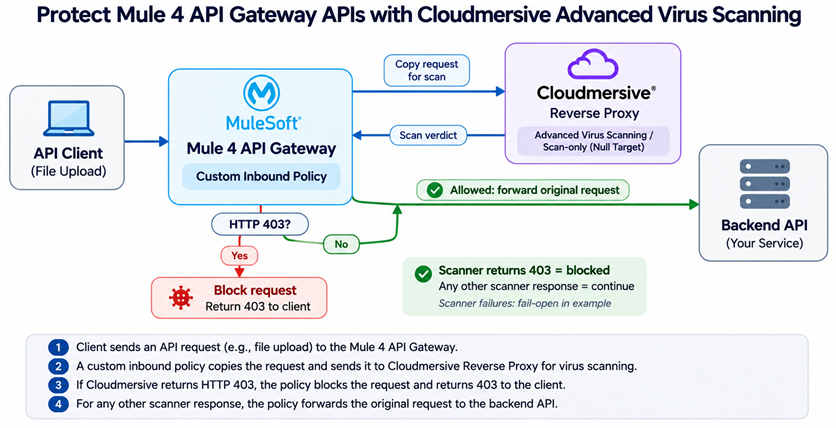
Customers using Mule 4 API Gateway (Mule Gateway) need to protect against malicious file uploads to their APIs. Cloudmersive offers a policy-based integration for inspecting incoming requests that contain file uploads and other binary payloads, using Cloudmersive Advanced Virus Scanning before the requests reach the backend API. To enable this, follow these steps:
-
In Anypoint Platform, navigate to API Manager and select the API instance you want to protect. Confirm the API is managed by Mule Gateway running on Mule 4. This example does not apply to the separately implemented Flex/Omni Gateway custom-policy runtime.
-
Create a Mule 4 custom inbound policy using the MuleSoft Policy Development Kit (or the supported Mule 4 custom-policy development workflow). A starting point with the PDK is:
pdk policy-project create --name cloudmersive-advanced-virus-scan --implementation-technology mule4
-
In the policy's template.xml, implement the following inbound scanning behavior. The snippet below shows the policy decision logic, and must be integrated with an HTTP Request operation, the policy project namespaces/dependencies, response transformation, and exception handling before deployment:
<!-- Mule 4 custom policy: illustrative inbound decision logic.
     Implement call-cloudmersive as an HTTP Request operation that:
     - sends the ORIGINAL HTTP method, URI/path, query, headers,
       and binary body to the configured Cloudmersive endpoint;
     - captures the scanner HTTP status, response body and Content-Type
       in variables without overwriting the inbound request;
     - accepts HTTP 403 as a response (not a transport exception);
     - uses a 30-second timeout;
     - records transport errors/timeouts without rejecting the request
       when reproducing the Azure APIM example's fail-open behavior.
-->
<http-policy:proxy name="{{{policyId}}}-cloudmersive-virus-scan">
  <http-policy:source>
    <!-- Invoke scanner and capture result: supplied by your policy implementation. -->
    <!-- call-cloudmersive -->
    <choice>
      <when expression="#[vars.scanStatus default 0 == 403]">
        <!-- Requires the Mule HTTP Policy Transform extension. -->
        <http-transform:set-response statusCode="403" reasonPhrase="Forbidden">
          <http-transform:body>#[vars.scanBody default 'Request blocked by security policy']</http-transform:body>
          <http-transform:headers>#[{'Content-Type': vars.scanContentType default 'text/plain'}]</http-transform:headers>
        </http-transform:set-response>
        <!-- Do NOT invoke execute-next: the backend is not called. -->
      </when>
      <otherwise>
        <!-- Allows the ORIGINAL request into the next policy/flow. -->
        <http-policy:execute-next/>
      </otherwise>
    </choice>
  </http-policy:source>
</http-policy:proxy>
Important: This is a logic template, not a complete, deployable XML policy. In particular, the scanner-call operation is intentionally left as an implementation step rather than suggesting that a bare http-policy:proxy block will make the HTTP call. Ensure that HTTP Request response data is captured separately, the incoming payload is repeatable, and multipart boundaries and binary content are preserved. For example, a scanner result of HTTP 403 must be captured for the choice instead of being thrown as an unhandled HTTP Request error. See Mule 4 Custom Policy Workflow, HTTP Policy Transform Extension and Mule 4 Custom Policy Reference.
-
Configure the custom policy to send a copy of the incoming request to your Cloudmersive Reverse Proxy Server endpoint, replacing the placeholder below with your actual endpoint:
https://your-cloudmersive-reverse-proxy-server
The Cloudmersive Reverse Proxy Server can run in a Cloudmersive Managed Instance or in your own Cloudmersive Private Cloud infrastructure. Configure a 30-second scanner timeout to align with the Azure API Management example. To reproduce that example exactly, treat scanner errors and timeouts as fail-open, forwarding the original request to the backend unless the scanner explicitly returns HTTP 403. For stricter security, consider fail-closed behavior instead.
-
Build and publish the custom-policy definition and implementation to Anypoint Exchange, then in API Manager → your API → Policies select and apply the policy. The Mule 4 policy must be packaged with the metadata and binary implementation required by your chosen development workflow; unlike Azure APIM, it is not installed by pasting a policy snippet directly into the API Manager UI. See Publish a Mule 4 Custom Policy.
-
In the Cloudmersive Management Portal, navigate to Private Cloud, find the node corresponding to the Reverse Proxy endpoint, and click Sites. Configure a site with the security policies appropriate for your API, such as Virus Scan File Upload Request (multipart/form-data) - Advanced Scan, Virus Scan JSON Binary Data Request (application/json) - Advanced Scan, or Virus Scan POST Raw Binary Data Request (raw POST body) - Advanced Scan.
-
Under Target, select Add Null Target to configure scan-only operation without an upstream origin. Under API Keys, select Add API Key and enter the appropriate API key and API endpoint for the scanning configuration.
-
Click Push Configuration. Test an allowed file upload and an intentionally blocked test upload. Verify that the blocked request returns HTTP 403 to the client without reaching the backend, while allowed requests continue with their original payloads. Also verify the configured behavior when Cloudmersive times out or is unreachable.
Once configured, incoming requests to the protected Mule 4 API are sent to Cloudmersive Reverse Proxy Server for policy enforcement before reaching the backend. Cloudmersive runs in scan-only / Null Target mode and does not itself forward traffic to the backend. When the scanner returns HTTP 403, the Mule 4 custom policy stops the request and returns the scanner's rejection to the client. Other scanner responses allow the original request to proceed to the backend, matching the behavior of the Azure API Management integration.
Implementation note: MuleSoft requires the policy implementation to preserve method, path, query, headers, binary body and stream repeatability. Validate file sizes, multipart payloads and timeouts in your Mule 4 runtime before using this integration in production. If only upload endpoints require scanning, scope the custom policy to those resources.
|

 Knowledge Base


 Virus Scan APIs
 Content Disarm and Reconstruction APIs
 Spam Detection APIs
 Document Conversion & Processing APIs
 Document AI APIs
 Natural Language Processing (NLP) APIs
 Optical Character Recognition (OCR) APIs
 Image and Face Recognition and Processing APIs